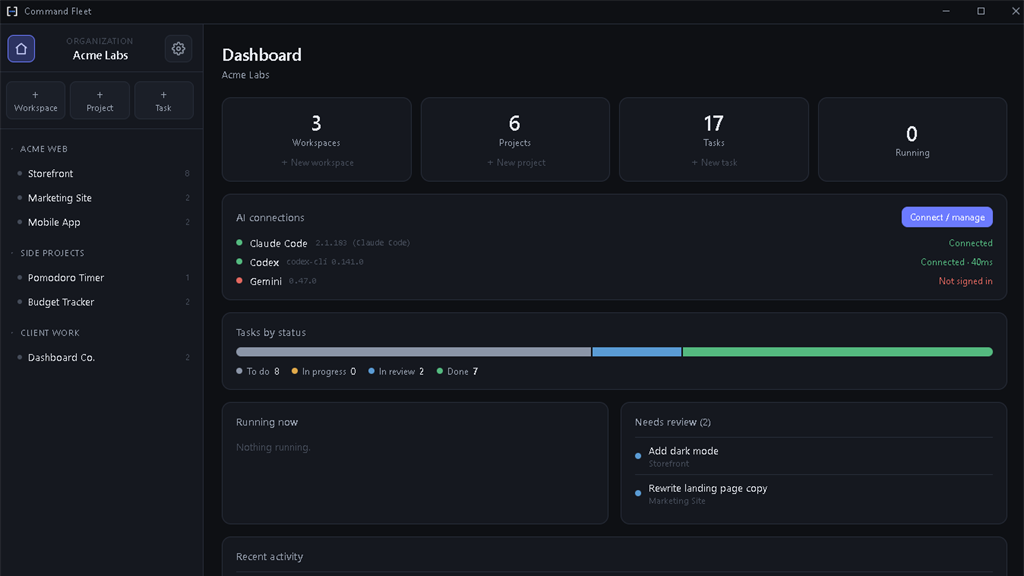
Single-project AI tooling is a solved problem. The hard part starts when you have several projects in flight and an agent working in each. Context-switching eats your day, you forget which agent did what, and "I'll review that diff later" turns into a graveyard of half-finished branches. Here's a workflow that keeps a whole portfolio moving.
1. Model your work as workspaces, not tabs
The first mistake is treating every project as an isolated window. Instead, give yourself one structure: an organization at the top, a workspace per product line or client, and projects inside each. Now "what's the state of everything?" is one screen, not twelve.
For an agency, a workspace per client also keeps boundaries clean — each client's projects, context, and secrets stay grouped and separate.
2. Make every run disposable
The thing that makes parallelism safe is isolation. Each task should run in its own git worktree on its own branch, so five agents across five projects can work at once and none of them touch your main working tree. If a run goes sideways, you discard the branch and nothing is lost.
Rule of thumb: if you'd be nervous letting an agent run unattended, you don't have enough isolation. Worktrees plus a review step fix that.
3. Put a review queue between "done" and "merged"
Agents finish work; that doesn't mean it's right. The highest-leverage habit is a single queue of runs that are waiting on you. Read the diff, run a verify gate (your build and tests), then merge or send a follow-up. A "needs review" view across all projects means nothing falls through the cracks.
4. Batch the boring, escalate the hard
Not every task deserves your best model or your attention. Dispatch routine changes — dependency bumps, copy tweaks, test scaffolding — to a cheaper agent and let them pile up in review. Save the expensive model and your eyes for the architectural work. Choosing the agent per task is what makes this practical.
5. Let a manager handle the multi-step builds
When a project is a whole build rather than a single change, decomposing it by hand is the bottleneck. This is where an autonomous workspace manager earns its keep: describe the outcome, and it plans the task graph, dispatches each step in dependency order, retries failures, and merges as it goes — surfacing only the decisions that need you.
A day in the workflow
- Morning: open the dashboard, clear the review queue from overnight runs.
- Midday: dispatch a batch of small tasks across projects; kick off one larger build with the manager.
- Afternoon: review and merge as runs complete; send follow-ups where needed.
The shift is subtle but huge: you stop being the person typing in one repo and become the person directing work across all of them.
Common multi-agent failure modes (and how to avoid them)
When you run AI coding agents across several projects, the failures are rarely dramatic — they're quiet. The most common is lost context: you context-switch so often that you forget which agent was doing what, and a half-finished branch sits untouched for a week. The second is the review graveyard: agents finish faster than you review, so "I'll look at that diff later" turns into a pile of unmerged work. The third is collision: two agents editing the same working tree clobber each other and you lose changes.
Each has a structural fix. Lost context is solved by making work visible on a board per project plus a portfolio dashboard, so state is a picture rather than something you hold in your head. The review graveyard is solved by a single cross-project review queue and an automated verify gate that filters out anything that doesn't build before it reaches you. Collisions are solved by giving every task its own isolated git worktree on its own branch, so parallel AI agents never touch the same files. Notice the pattern: the fixes are properties of your tooling, not your willpower.
Tooling that keeps multi-project AI work sane
If you're managing multiple AI coding agents, four capabilities do the heavy lifting. Workspaces and projects give you a place to group a portfolio — a workspace per client or product line — so "what's the state of everything?" is one screen. Isolated worktrees make every run disposable, so you can fan five agents across five projects without fear. A cross-project review queue with an in-app diff and a verify gate turns review into a focused daily pass. And an autonomous workspace manager handles the multi-step builds — planning a task graph, dispatching each step, retrying failures, and merging — so you only weigh in on the decisions that matter.
Command Fleet bundles all four into one local-first app: agent-agnostic dispatch to Claude Code, Codex, or Gemini, a board per project, a home dashboard across the portfolio, and an autonomous build loop — with your code and keys on your own machine.
A weekly rhythm for a portfolio of AI agents
The daily loop — clear the review queue, dispatch a batch, merge as runs finish — keeps the work moving, but a light weekly rhythm keeps it healthy. Once a week, scan each project's board for stale "In review" cards and either merge, re-dispatch with feedback, or discard them so nothing rots. Glance at your tasks-by-status across the portfolio to spot a project that's quietly stuck. And review which agent you've been routing work to: if a model keeps needing follow-ups on a certain kind of task, switch it. Treating your fleet of AI coding agents like a team you manage — daily standup, weekly retro — is what turns raw parallelism into reliable shipping.
Key takeaways for managing multiple AI coding agents
If you remember nothing else about running AI coding agents across many projects, remember that the hard part is coordination, not capability — and coordination is solved by tooling, not willpower. The practices that keep a portfolio of agents moving are consistent:
- Model work as workspaces and projects, not browser tabs, so "what's the state of everything?" is one screen.
- Make every run disposable with an isolated git worktree per task, so parallel agents never collide and a bad run is thrown away cleanly.
- Put a review queue between "done" and "merged", with a verify gate filtering out anything that doesn't build before it reaches you.
- Batch the boring, escalate the hard — route routine changes to a cheaper agent and save your strongest model and your attention for the architectural work.
- Let an autonomous manager handle multi-step builds, planning the task graph and merging as it goes, surfacing only the decisions that need you.
Do those five things and managing five — or fifteen — AI coding agents feels less like juggling and more like directing a team. That's exactly the workflow Command Fleet is built to give you: agent-agnostic dispatch, a board per project, a cross-project review queue, and an autonomous build loop, all local-first on your own machine.
Frequently asked questions
How many AI coding agents can I run at once?
As many as your tasks and a safe concurrency cap allow. Each run executes in its own git worktree on its own branch, so parallel agents across multiple projects never touch your working tree or each other.
How do I keep track of what each agent did?
Use a single cross-project review queue. Every finished run waits there with its diff and history, so 'needs review' is one screen instead of a graveyard of half-finished branches.
Is this suitable for an agency with multiple clients?
Yes. A workspace per client keeps each client's projects, context and secrets grouped and separate, while the home dashboard rolls everything up.
How do I avoid agents creating merge conflicts?
Isolation plus integration order. Each task runs on its own branch, and a finished, passing branch is merged before dependent tasks start — if a merge conflicts, that task routes to review instead of being forced through.
Run your whole portfolio from one board
Command Fleet gives you workspaces, isolated runs, a cross-project review queue, and an autonomous manager. Free for 7 days.