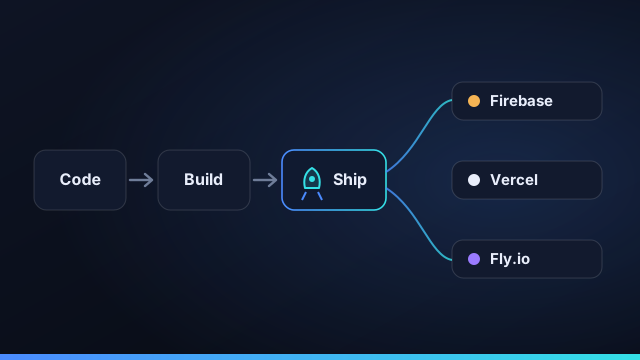
Building an app with AI is no longer the hard part. Shipping it is. Most "watch AI build your app" demos quietly end at a working preview — and a preview is not production. Getting from a sentence to a live URL means handling the unglamorous parts a one-shot agent skips: a known target, the right environment, and the credentials to deploy. Here's how to close that gap reliably.
The gap between "it builds" and "it ships"
A green preview tells you the code runs on your machine. A deploy has to answer harder questions: which platform, with what build settings, using which secrets, to which environment? Skip any of those and you get the classic "works in preview, breaks in prod." The fix is to make deployment a known process, not a final improvisation.
Stack packs: deterministic setup, real targets
Start the project from a stack pack — Firebase, Vercel, Netlify, Cloudflare, Supabase, or Fly. A stack pack is deterministic scaffolding: a real project structure, the right dependencies, and a preview/deploy manifest. The app begins life in a shape that platform already understands, so deployment isn't a guess bolted on at the end.
One manifest for preview and deploy
Preview and deploy should read the same manifest. When they do, what you previewed is exactly what ships — same build command, same output, same routing. There's no second, divergent configuration to drift out of sync.
A deploy you can't reproduce isn't a deploy — it's a lucky accident. The manifest is what makes it repeatable.
Credential gating: deploys wait for secrets
The pipeline stays gated until every required credential is present, so a deploy never half-fires with a missing key and leaves you with a broken release. Credentials live in a per-project secrets vault that the agents writing your code never see — the deploy step reads them directly.
Where each stack pack fits
| Platform | Good fit for |
|---|---|
| Firebase | Auth + Firestore apps and fast MVPs |
| Vercel | Next.js and frontend-first apps |
| Netlify | Static sites with serverless functions |
| Cloudflare | Edge workers and global low latency |
| Supabase | Postgres + auth backends |
| Fly | Full containers running close to users |
Ship, then ship again
The real test of a deploy pipeline is the second deploy, and the tenth. Because preview and deploy share a manifest and credentials are gated, every release after the first is the same repeatable step — not a fresh adventure. That's what turns "we got it live once" into "we ship continuously."
From one sentence to a URL — with a manifest, not a prayer, in between.
Environments, secrets, and config
The part of deployment that trips up AI-built apps is rarely the build — it's the environment around it. A real deploy needs the right environment variables, the right config for staging versus production, and the secrets to talk to your database, auth provider, and third-party APIs. Handled badly, this is where "works on my machine" becomes "broken in prod." Handled well, it's invisible: deploy credentials live in a per-project secrets vault that's never included in any agent prompt, the deploy step reads them directly, and the pipeline stays gated until every required credential is present so a release never half-fires with a missing key. Keeping a clean separation between config the app needs and secrets only the deploy step should see is what makes shipping an AI-built app boringly repeatable.
Common deployment pitfalls with AI-built apps
A few failure modes show up again and again. The first is a preview that doesn't match production — different build commands or config between the two, so what you tested isn't what shipped; sharing one manifest for preview and deploy eliminates it. The second is the one-off deploy you can't reproduce: it worked once, by hand, and nobody can repeat it or roll it back. The third is secrets in the wrong place — pasted into a prompt or committed to the repo. The fourth is shipping unverified work: an agent's change that builds but quietly breaks a flow, because nothing reviewed it. Each pitfall has the same antidote — a deterministic pipeline with a shared manifest, credential gating, and a review gate before anything goes live.
From one deploy to continuous shipping
The real test of a deploy pipeline isn't the first release; it's the tenth. Because preview and deploy share a manifest and credentials are gated, every release after the first becomes the same repeatable step rather than a fresh adventure — which is exactly what turns "we got it live once" into continuous shipping. And because each promotion is a discrete step from a known-good preview, rolling back is just redeploying the previous version. With Command Fleet, the whole arc — scaffold from a stack pack, build with agents in isolated worktrees, review the diff, and deploy to Firebase, Vercel, Netlify, Cloudflare, Supabase, or Fly — lives in one app, so prompt-to-production isn't a chain of tools you assemble but a loop you run.
A pre-deploy checklist for AI-built apps
Before you promote an AI-built app to production, a quick checklist catches the issues that tests don't:
- Did you preview the exact build? Confirm the preview was built from the same manifest you're about to deploy.
- Are all required credentials in place? The pipeline should be gated until they are, so a deploy can't half-fire.
- Are secrets out of the repo and out of prompts? Deploy credentials belong in a per-project vault, not a committed file.
- Did the change pass the verify gate and your review? Build, tests, and a human sign-off before anything ships.
- Can you roll back? Because each release is a discrete promotion from a known-good build, the previous version should be one redeploy away.
- Is the target right? The stack pack should match where the app is meant to live — Firebase, Vercel, Netlify, Cloudflare, Supabase, or Fly.
Run that list once and shipping an AI-built app stops being a leap of faith. With Command Fleet most of it is enforced automatically — shared manifest, credential gating, verify gate, and review — so "prompt to production" stays repeatable instead of risky.
Frequently asked questions
Can AI agents deploy my app automatically?
They can run the deploy pipeline end to end, but it's gated until every required credential is in place — so a deploy never fires with missing secrets. Preview and deploy share one manifest, so what you previewed is what ships.
Which platforms can Command Fleet deploy to?
Six stack packs: Firebase, Vercel, Netlify, Cloudflare, Supabase, and Fly. Each gives a real project structure and a shared preview/deploy manifest rather than a one-off guess.
What is a stack pack?
A deterministic scaffold for a target platform — project structure, dependencies, and a preview/deploy manifest — so the app starts from a known-good shape instead of an agent improvising the setup.
How do I keep deploy credentials out of agent prompts?
Store them in a per-project secrets vault that's never included in any prompt. The deploy step reads them directly; the agents that wrote the code never see them.
From prompt to production
Command Fleet scaffolds from a stack pack, shares one manifest for preview and deploy, and gates on credentials. Free for 7 days, no credit card.